Site Search


Contact: Mr Yuan
Mobile:18822809251
Tel:+86-0755-2314670
QQ:2144782477
e-mail:szhsxpcb@126.com
Address:No. 1 Xinhe Avenue, 8th Industrial Zone, Gonghe Community, Shajing Sub-District Office, Bao'an District, Shenzhen .
Detailed Process of PCB Copying (PCB Circuit Board Copying)
The technical process of PCB copying, in simple terms, involves first scanning the circuit board to be copied and recording the detailed positions of all components. Then, the components are removed to create a Bill of Materials (BOM) for procurement. The empty board is scanned into an image, which is processed by PCB copying software to restore it into a PCB layout file. This PCB file is then sent to a PCB manufacturing factory for production. Once the board is manufactured, the procured components are soldered onto it. After that, the circuit board undergoes testing and
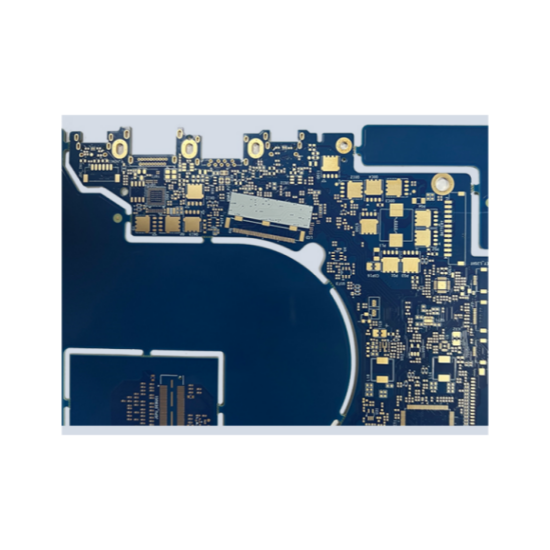
debugging. Here are the specific steps for PCB copying:
Record Component Details: When you have a PCB, first record the model, parameters, and positions of all components on paper, especially the orientation of diodes, transistors, and the notch direction of ICs. It's best to take two photos of the component positions with a digital camera. Modern PCBs are becoming more advanced, and some diodes and transistors on them are barely noticeable if not carefully examined.
Remove Components and Clean the Board: Remove all components and clean the solder from the PAD holes. Clean the PCB with alcohol and then place it in a scanner. Slightly increase the scanning resolution for clearer images. Then, lightly sand the top and bottom layers with water sandpaper until the copper foil shines, and scan them again. Open Photoshop and scan both layers in color mode. Note that the PCB must be placed flat and straight in the scanner; otherwise, the scanned images will be unusable.
Adjust Image Contrast and Brightness: Adjust the contrast and brightness of the canvas to create a strong contrast between the areas with and without copper foil. Convert the image to black and white and check if the lines are clear. If not, repeat this step. If they are clear, save the image as a black-and-white BMP file (TOP.BMP and BOT.BMP). If any issues are found in the graphics, they can be repaired and corrected using Photoshop.
Convert BMP Files to PROTEL Format: Convert the two BMP files into PROTEL format files. Import both layers into PROTEL. If the PAD and VIA positions of the two layers basically coincide, it indicates that the previous steps were well done. If there is any deviation, repeat the third step. PCB copying is a task that requires great patience, as even small issues can affect the quality and matching degree after copying.
Convert TOP Layer BMP to TOP.PCB: Convert the TOP layer BMP to TOP.PCB, making sure to convert it to the SILK layer (the yellow layer). Then, trace the lines on the TOP layer and place the components based on the diagram from the second step. After completing the tracing, delete the SILK layer. Repeat this process until all layers are drawn.
Combine Layers in PROTEL: Import TOP.PCB and BOT.PCB into PROTEL and combine them into one diagram.
EE Chip Video Recommendation
Video: Runsun Technology: Sensing the World, Connecting the Future
Print and Verify: Use a laser printer to print the TOP LAYER and BOTTOM LAYER onto transparent film (1:1 scale). Place the film on the original PCB and compare it for any discrepancies. If everything matches, you've successfully completed the task.
A copied board identical to the original is born, but this is only half done. Testing is still needed to verify if the electronic performance of the copied board matches the original. If it does, then the task is truly complete.
Note: For multilayer boards, carefully sand down to the inner layers and repeat steps three to five. The naming of the graphics will also differ, depending on the number of layers. Generally, copying a double-sided board is much simpler than a multilayer board. Multilayer board copying is prone to misalignment issues, so extra care and caution are needed (especially with the internal vias and non-vias).
Double-Sided Board Copying Method
Scan the top and bottom surfaces of the circuit board and save two BMP images.
Open the PCB copying software Quickpcb2005, click "File" > "Open Background Image", and open one of the scanned images. Use PAGEUP to zoom in and see the pads. Place a pad with PP and trace lines with PT, just like tracing a diagram as a child. Trace everything in the software and click "Save" to generate a B2P file.
Click "File" > "Open Background Image" again and open the other scanned color image.
Click "File" > "Open" and open the previously saved B2P file. We will see the board we just copied overlaid on this image – the same PCB with holes in the same positions but different wiring connections. So, click "Options" > "Layer Settings" and turn off the display of top-layer traces and silkscreen, leaving only the multilayer vias.
The top-layer vias align with the vias on the bottom-layer image. Now, just like tracing a diagram in childhood, trace the bottom-layer wiring. Click "Save" again – the B2P file now contains data for both the top and bottom layers.
Click "File" > "Export as PCB File" to obtain a PCB file with data for both layers. This file can be used for modifying the board, generating a schematic, or sending directly to a PCB manufacturing factory for production.
Multilayer Board Copying Method
In fact, copying a four-layer board involves repeating the process for two double-sided boards, and a six-layer board involves repeating it for three double-sided boards. Multilayer boards can be intimidating because we cannot see the internal wiring. How can we see the inner workings of a precise multilayer board? – By layer separation.
There are many methods for layer separation nowadays, such as chemical etching and tool stripping, but these can easily damage the layers and lose data. Experience tells us that sanding is the most accurate method.
After copying the top and bottom layers of the PCB, we typically use sandpaper to gently sand away the surface and reveal the inner layers. Use ordinary sandpaper from a hardware store, lay the PCB flat, and press down on the sandpaper while rubbing it evenly across the PCB (if the board is small, you can also lay the sandpaper flat and use one finger to press the PCB and rub it on the sandpaper). The key is to keep it flat for even sanding.
Silkscreen and solder mask can be wiped off easily, while copper traces and planes require a bit more scrubbing. Generally, a Bluetooth board can be sanded in a few minutes, while a memory module may take about ten minutes. Of course, the time will vary depending on the amount of force applied.
Sanding is currently the most commonly used and economical method for layer separation. You can try it on a discarded PCB. There is no technical difficulty in sanding, but it can be a bit tedious and requires some effort. Don't worry about sanding through the board or hurting your fingers.
During the PCB layout process, after completing the system layout, review the PCB diagram to ensure that the system layout is reasonable and can achieve optimal results. Typically, the following aspects can be considered:
Does the system layout ensure reasonable or optimal wiring and reliable wiring and circuit operation? When laying out components, it is necessary to have an overall understanding and planning of signal routing, power, and ground networks.
Does the PCB size match the manufacturing drawing dimensions and meet PCB manufacturing process requirements? Are there any fiducial marks? This point requires special attention. Many PCB layouts are beautifully and reasonably designed, but the precise positioning of connectors is neglected, resulting in the designed circuit being unable to interface with other circuits.
Are the components spaced evenly and neatly arranged, and have all components been placed? When laying out components, it is necessary to consider not only the signal routing and signal types, areas that require attention or protection, but also the overall density of component placement to achieve an even distribution.
Can components that need frequent replacement be easily replaced, and is it convenient to insert plugin boards into the equipment? Ensure that frequently replaced components can be replaced and plugged in conveniently and reliably.
+8618822809251
Website:www.huashing-pcb.com
Address:No. 1 Xinhe Avenue, 8th Industrial Zone, Gonghe Community, Shajing Sub-District Office, Bao'an District, Shenzhen .
